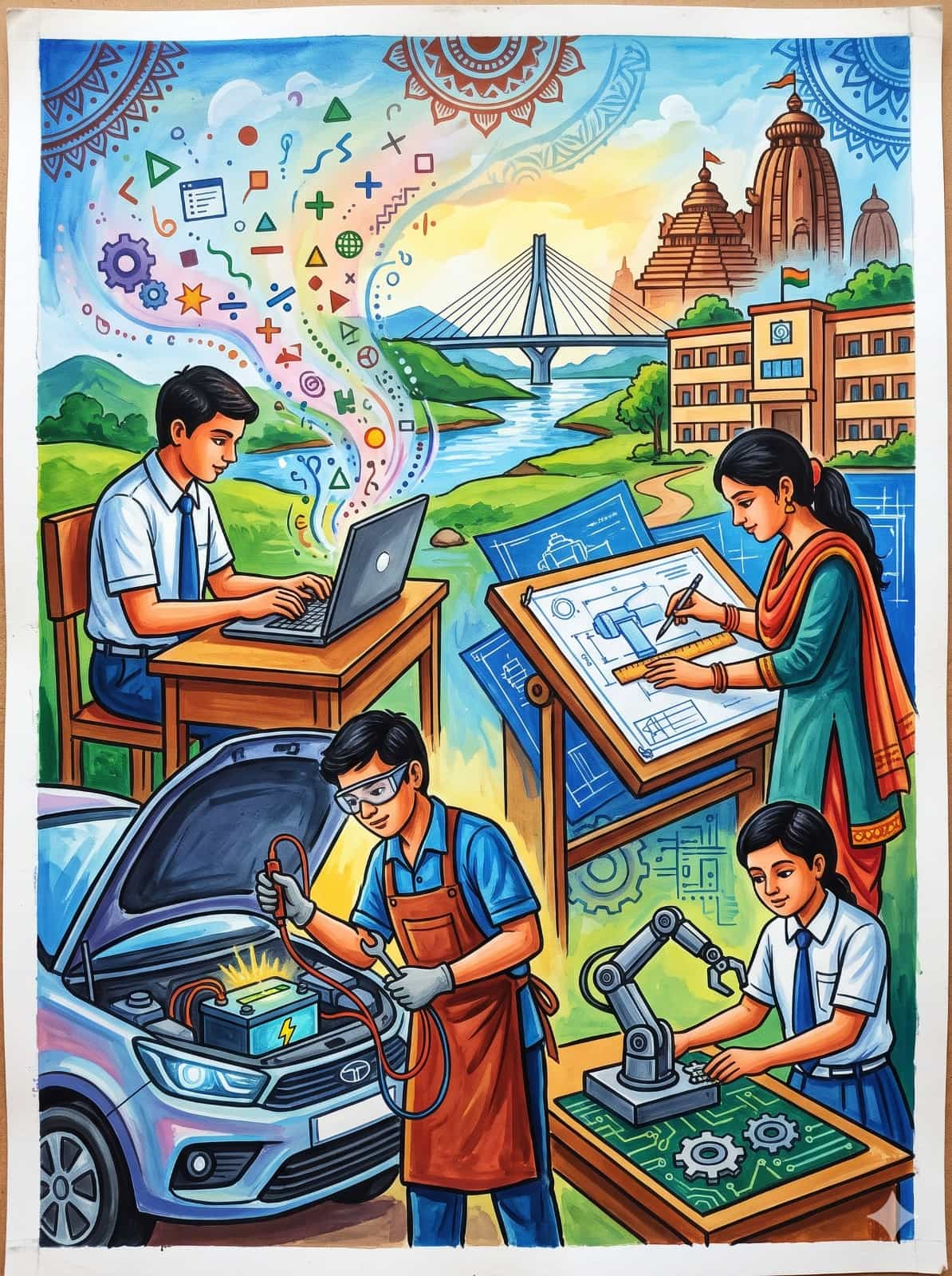
Visual Metaphors Used:
- Cultural Roots & Architecture (Top Right & Borders): The Shikhara of the Jagannath Temple, Cuttack’s Netaji Subhas Chandra Bose Setu, and traditional Sambalpuri/Pattachitra circular framing represent Odisha’s cultural foundation bridging directly into modern infrastructure.
- The FLN Stream (Top Left to Center): An energetic beam containing mathematical operators ($+, -, \times, \div$), geometric figures, and digital code symbols cascades directly from the learner’s laptop, illustrating how foundational numeracy feeds advanced STEM fields.
- Vocational & Practical Dexterity (Foreground):
- Digital Literacy: A school student in uniform working on a laptop.
- Design & Architecture: A female student drafting mechanical schematics on a drafting table.
- Automotive Engineering: A vocational trainee handling EV battery electronics and wrenches in safety gear.
- Robotics & IoT: A student assembling a robotic manipulator on a printed circuit board.
2. Materials & Color Palette
- Recommended Paper: 200–300 GSM Cold Pressed Watercolor Sheet or Cartridge Sheet (Half Imperial / A3 size).
- Medium: Poster colors combined with gouache or opaque acrylics for crisp linework.
- Linework & Inking: 0.5 mm & 0.8 mm waterproof archival fineliners or dark brown/black poster color mixed thinly with a round brush (No. 0 or 1).
- Core Palette:
- Sky & Distance: Cobalt Blue, Cerulean, Lemon Yellow, and White.
- Foliage & Landscape: Sap Green, Viridian, and Burnt Sienna.
- Flesh Tones: Yellow Ochre mixed with Scarlet and White; shaded with Burnt Umber.
- Technical Elements (Schematics & Machine): Prussian Blue, Sky Blue, Cool Grey, and White highlights.
3. Step-by-Step Drawing Process
Step 1: Structural Grid & Sketching
- Divide your paper using light pencil guidelines (2B pencil) into three vertical zones:
- Upper Third: Traditional architecture, motifs, bridge, and sky.
- Middle Third: School building, landscape, and drafting/laptop stations.
- Lower Third (Foreground): Hands-on mechanical, automotive, and robotics setups.
- Block in human proportions using simple mannequin wireframes before committing to facial details and uniforms.
- Draw the mechanical perspective of the car hood and drafting table using 2-point perspective to establish ground depth.
Step 2: Atmospheric Background Wash
- Start from the top: wash the sky using a wet-on-dry gradient of Lemon Yellow near the horizon blending upward into clean Cerulean Blue.
- Paint the river valley and distance hills with light washes of Sap Green and Pale Olive.
- Detail the temple shikhara and the modern cable-stayed bridge with muted Ochres and cool Greys to ensure they remain in atmospheric perspective without overpowering the foreground.
Step 3: Architecture & Traditional Motifs
- Paint the top mandala corners with Crimson, Ochre, and Prussian Blue, reflecting Odishan traditional folk art borders.
- Apply solid flat colors to the school building using Terracotta/Light Sienna for the facade, leaving the window frames crisp and white.
Step 4: Midground Figures (Digital & Architectural Design)
- The Laptop Station (Left):
- Apply flat skin tones to the boy; build form by glazing light crimson on cheeks and deep ochre on jawlines.
- Paint the school uniform (White shirt, Deep Blue tie and trousers).
- Swirl the vibrant multi-colored beam upward using bright Primary Red, Orange, Lime Green, and Sky Blue. Add the floating geometric and numerical symbols with opaque white gouache.
- The Drafting Desk (Right):
- Paint the architectural blueprint table with an ultramarine wash, defining the machine cross-sections with sharp white gel pen or fine white gouache lines.
- Paint the girl’s kurta with Viridian/Teal and a warm saffron dupatta.
Step 5: Foreground Focal Elements (Automotive & Robotics)
- The Car & Electric Battery (Lower Left):
- Use Payne’s Grey and Cerulean for the car body reflections, leaving sharp, unpainted white slivers for automotive gloss.
- Highlight the battery terminal with intense Lemon Yellow mixed with White to suggest electrical charge.
- Color the mechanic’s apron in warm Burnt Umber/Tan to add organic contrast against the cold metallic blues.
- The Robotics Table (Lower Right):
- Base the circuit tabletop in bright Malachite or Emerald green.
- Paint the robotic arm using neutral greys, highlighting joints with pure white spots.
- Complete the seated student in matching school uniform, focused directly on component calibration.
Step 6: Contours, Highlights, and Final Detailing
- Inking: Outline all figures, tools, and foreground objects using a thin No. 1 synthetic round brush with deep sepia or waterproof fineliners to give the illustration graphic punch.
- Highlights: Use opaque White to punch out reflections on safety goggles, metal tools, laptop keys, and structural cables.
- Clean-up: Erase stray pencil marks and clean borders with a kneaded eraser.
4. Key Takeaways for Competition Judges
| Evaluation Factor | How This Artwork Delivers |
|---|---|
| Theme Alignment | Integrates foundational literacy/numeracy (symbols & laptop) seamlessly with secondary & vocational empowerment. |
| Color Balance | Warm earthen tones (temple, aprons, desks) counteract cool industrial blues (schematics, automotive body, sky). |
| Regional Identity | Clear Odisha markers (Jagannath Temple, Netaji Setu, tribal/Ikat borders) anchor national skill programs locally. |